

Written by: Kelly Campbell, Vice President of Marketing, Stayntouch
Key Takeaways
- Most independent hotels operate without a dedicated RMS and rely on manual processes. When structured, these processes still deliver consistent revenue gains.
- A disciplined weekly workflow, built around booking pace, a defined rate ladder, and clear restrictions, protects revenue and outperforms ad-hoc pricing.
- Tracking RevPAR, ADR, and occupancy in a simple Excel dashboard gives the visibility needed to make data-driven rate decisions each week.
- Warning signs such as missed optimal windows, spreadsheet errors, or meetings that drag on indicate when manual processes have reached their limit.
- When you are ready to automate the rules you have built, see how Stayntouch Rate Strategy executes them inside your PMS without extra contracts or complexity.
Why Manual Revenue Management Still Works for 30–150-Room Hotels
Revenue management means selling the right room to the right guest at the right price and time. The core metrics are ADR, RevPAR (revenue per available room, or total room revenue divided by all rooms available), BAR (best available rate, or the lowest unrestricted publicly available rate for a given date), and booking pace (how quickly reservations are accumulating for a future stay date compared to the same point in a prior period).
For a 30–150-room independent hotel, a full RMS is often unnecessary at the outset. Independent hoteliers can maintain professional revenue management practice in 30–60 minutes per week of review time when the right strategy and tools are in place. The main constraint is structure, not intent. Most properties that underperform on rate do so because pricing decisions happen reactively, inconsistently, or not at all beyond the next two weeks.
A 2025 study by Roland Schegg of 1,500-plus hotels across Austria, France, Germany, Greece, Italy, and Switzerland found that many properties with a formal revenue management strategy still rely on Excel. That reality creates a starting point, not a failure. The steps below give that Excel process the structure it needs to produce consistent results.
Step 1: Build a Simple Demand Calendar Using Booking Pace
Booking pace sits at the foundation of every pricing decision. Before setting a rate, a hotel needs to know whether a future date is filling faster or slower than it did at the same point last year.
Booking pace is calculated by dividing rooms currently on the books for a future stay date by the rooms on the books for the same date at the same point last year, then multiplying by 100. A result above 100 means demand is running ahead of last year, while a result below 100 means it is behind.
Build the demand calendar in a spreadsheet with one row per future date for the next 90 days. Include these columns:
- Date and day of week
- Known demand triggers (local events, holidays, school breaks)
- Rooms on the books today
- Rooms on the books at the same point last year
- Variance in room nights and percentage
- Demand tier assigned: Low, Standard, High, or Peak
If the PMS lacks a booking pickup or pace report, historical baseline data can be reconstructed by working backward from cancellation and checkout records. Most PMS platforms store the reservation data needed for this comparison without additional software.
Manual forecasting works best when refreshed weekly for the next 90 days, monthly for a rolling 12-month forecast, and quarterly for accuracy review. Refresh the demand calendar every Monday morning before any other revenue task.
Step 2: Construct and Maintain a Rate Ladder by Occupancy Band
A rate ladder is a pre-set sequence of BAR levels, each tied to a specific occupancy threshold or pace signal. This structure removes the need to invent a price from scratch each time conditions change.
Most properties work best with 5–7 rate tiers. Fewer tiers create steps too wide to match market demand, while more tiers cause trigger overlap and complicate execution. A practical example for a 75-room property with a $90 floor rate:
| Tier | BAR | Occupancy Trigger | Pace Signal |
|---|---|---|---|
| L1 Floor | $109 | Under 40% booked, 21+ days out | 10+ points behind last year |
| L2 Low | $129 | 40–59% booked | Tracking with last year |
| L3 Standard | $149 | 60–74% booked | On pace |
| L4 High | $169 | 75–84% booked | 5–10 points ahead |
| L5 Peak | $199 | 85–89% booked | 10+ points ahead |
| L6 Premium | $229 | 90–94% booked | Accelerating pickup |
| L7 Last Room | $269 | 95%+ booked | Steady pickup, few rooms left |
Once the ladder is defined, the next challenge is execution. Move one tier at a time when climbing the ladder so the market can validate the change before further increases, and require at least two independent signals before moving above the midpoint tier. Smaller properties should set their first occupancy trigger at a lower percentage, often 50%, because scarcity becomes commercially relevant sooner.
Apply day-of-week adjustments on top of the ladder. Friday and Saturday nights typically warrant one tier higher than the same occupancy on a Tuesday. Shoulder dates, the nights immediately before and after a peak period, need separate review because they often fill later and at a different pace than the peak itself.
Log every tier change with a one-line reason. This audit trail lets you evaluate whether a ladder move produced the intended result during the following week.
Step 3: Apply Manual Restrictions and Channel Rules
Rate changes alone rarely protect revenue on high-demand dates. Restrictions prevent inventory from being consumed by short, low-value stays before higher-value multi-night bookings arrive.
The three restrictions most relevant to a manual process are:
- Closed to arrival (CTA): Guests cannot begin a stay on that date. Use this to prevent one-night stays from fragmenting inventory around a peak night.
- Minimum length of stay (MinLOS): Guests must book a minimum number of nights. A two-night minimum on a Saturday protects Friday and Sunday inventory.
- Sell limits: A cap on how many rooms may be sold for a given date, set to protect against overselling or to hold inventory for a higher-value segment expected to book closer to arrival.
On the tightest dates, a minimum-length-of-stay restriction should be applied to protect high-value multi-night demand, while floors and ceilings are confirmed so no rate slips outside the guardrails.
For channel rules, review OTA (online travel agency) sell limits weekly. If a date is filling faster through high-commission OTA channels than through direct, tighten OTA availability and push the direct rate. Manual processes often cause hotels to accept lower-margin OTA bookings before realizing that direct demand is building, which leaves less inventory available for higher-value segments once conditions tighten.
Step 4: Run the Repeatable Weekly Workflow
Consistency turns a revenue management checklist into a revenue management habit. The weekly review should always occur on the same day and time, and every check should end with either “no action” or one specific pricing or inventory change.
Start with a brief daily pickup check. Spend five to ten minutes each morning reviewing rooms added for the next 14 days and flag any date that has moved more than 10 percentage points ahead of or behind last year’s pace. This quick scan feeds the Monday meeting rather than replacing it.
The Monday revenue meeting agenda follows a specific sequence because each step informs the next:
- 0–5 min, Scorecard review: RevPAR this week vs. last week vs. same week last year; ADR by room type; occupancy; pickup for the next 7, 14, and 30 days; channel mix; cancellation trend. This snapshot shows where performance is shifting.
- 5–15 min, Booking pace and pickup analysis: Next 14, 30, and 60 days. Flag dates more than 15% ahead or behind last year so the team knows which dates need action.
- 15–30 min, Pricing decisions: Top 10 demand dates. Move ladder tiers, set or lift restrictions, and adjust sell limits based on the flagged dates.
- 30–40 min, Distribution and channel check: OTA parity, direct booking conversion, and any mapping issues. This step confirms that the chosen prices and rules appear correctly in every channel.
- 40–45 min, Actions and owners: Every decision gets a named owner and a review date so follow-through is clear.
The biggest mistake in weekly revenue meetings is spending the entire session explaining numbers instead of making decisions on rates, rules, or promotions and assigning owners. The scorecard exists to surface decisions, not to narrate history.
Explore how Rate Strategy automates these tier movements and restriction rules.
Step 5: Create a Lightweight RevPAR Dashboard in Excel
A RevPAR dashboard can stay simple and still be effective. It needs to answer four questions every Monday morning: Is occupancy for the next 30 days ahead or behind, is ADR moving in the right direction, is RevPAR improving week over week, and are any upcoming peak dates at risk.
Build the dashboard with one tab per month and the following columns per row, with one row per future date:
| Column | Formula / Source | Decision It Drives |
|---|---|---|
| Date / Day | Manual entry | Day-of-week tier adjustment |
| Rooms on Books | PMS export | Occupancy band for ladder tier |
| Occupancy % | Rooms on Books ÷ Total Rooms | Trigger for rate move |
| Current BAR | Manual entry from ladder | Rate parity check |
Add a fifth column for RevPAR, calculated as total room revenue divided by total rooms available, and track it week over week. Two consecutive weeks of falling RevPAR are the recommended trigger for a full strategy review.

A practical manual workflow for independent hotels is to pull bookings on hand for the next 90 days from the PMS, compare pace to last year at the same point, flag any date more than 15% ahead or behind, check the local event calendar and competitor rates for flagged dates, then adjust rates accordingly. This entire routine typically takes under an hour per week.
Step 6: Monitor Results and Spot When the Manual System Is Outgrown
A manual process has a natural ceiling, and the early-warning signs that it has been reached are specific and observable:
- Rate changes are being made after the optimal window has closed, competitors have already moved, and inventory is tighter.
- The Monday meeting regularly runs long because data assembly takes more time than decision-making.
- Spreadsheet formulas break or return stale data, and the error is not caught until after a pricing decision has been made.
- The same override is being applied manually to the same type of date week after week, which signals a rule rather than a recurring task.
- A second property, a new room type, or a new channel has been added, and the spreadsheet cannot accommodate the additional dimension without becoming unmanageable.
The primary risk of manual revenue management is the delay between a market change and the hotel’s response, which reduces sellable inventory and erodes margin. Spreadsheet errors such as broken formulas or stale pickup data can carry forward undetected, leading to incorrect pricing signals and measurable revenue shortfalls by the time the mistake is identified.
When any three of the warning signs above appear consistently over four weeks, the manual system has been outgrown. The fix is not a bigger spreadsheet, it is rule-based automation.
Step 7: Move to Rule-Based Automation Inside Stayntouch PMS
When the manual system reaches its limit, the documented rules built in Steps 1–6 become the foundation for automation. The workflow in those steps produces something valuable: a documented set of rules. Occupancy thresholds, pace triggers, restriction logic, and channel priorities are all written down. That documentation is exactly what rule-based automation needs to run.
Stayntouch Rate Strategy is built directly into Stayntouch PMS, the property management system that handles reservations, check-in and checkout, room assignment, housekeeping status, and billing. Rather than maintaining a separate RMS contract, Rate Strategy automates rate adjustments on configurable parameters with multiple thresholds inside a single strategy, responding to occupancy and demand without manual oversight.
The transition is designed to be low-friction. Rate Strategy trains in 20 minutes and activates instantly. The rules a hotel has been running manually in Excel become the parameters set inside the module. The Monday meeting shifts from data assembly and rate entry to strategy review and exception management.
Scope remains precise. Rate Strategy automates rule-based rate movement. It is not a full revenue management system and does not perform demand forecasting, competitor rate shopping, or market-data-driven price optimization. For hotels whose pricing need is rule-based automation, it removes the need for a separate contract. For hotels that need full revenue optimization, Stayntouch integrates with specialist platforms including Duetto, IDeaS, FLYR, Lighthouse, and PriceLabs, with all integration costs covered by Stayntouch at no additional charge. Each third-party platform charges its own platform fee separately.
Measurement: What Success Looks Like
Whether you run a manual process or transition to automation, the measurement framework stays the same. Track these four outcomes over a rolling 90-day window:
- ADR movement: Check whether the average rate per occupied room is increasing week over week on comparable dates. A disciplined ladder process should produce measurable ADR improvement within 60–90 days.
- Occupancy stability: Confirm that occupancy is holding or improving while ADR rises. The goal is to move both metrics together, not trade one against the other.
- Reduction in manual overrides: As the ladder rules become reliable, the number of ad-hoc rate changes outside the documented tiers should fall. Fewer overrides indicate that the system is working.
- Night-audit reconciliation time: Automated charge posting and rate management within the PMS can shorten accounting tasks, which signals that the manual burden has shifted to the system.
Research suggests improvements in forecast accuracy can lead to revenue gains. The manual process described here provides a legitimate path to that improvement. Automation then extends it further.
Advanced Considerations: Scaling and Next Steps
A single-property manual process becomes unsustainable at a predictable point. For multi-property operators, that point arrives earlier. Managing rate ladders, demand calendars, and restriction logic across two or more properties in separate spreadsheets multiplies the data-assembly burden without multiplying the decision-making capacity of the team.
Stayntouch Rate Strategy supports this transition. The same configurable parameters that automate rate movement at one property can be applied across a portfolio from a single login. The Stayntouch multi-property dashboard provides occupancy, ADR, and best available rate visibility across all properties simultaneously. Central configuration pushes rate types, deposit policies, and restriction logic to every property in the group, written once and applied everywhere.
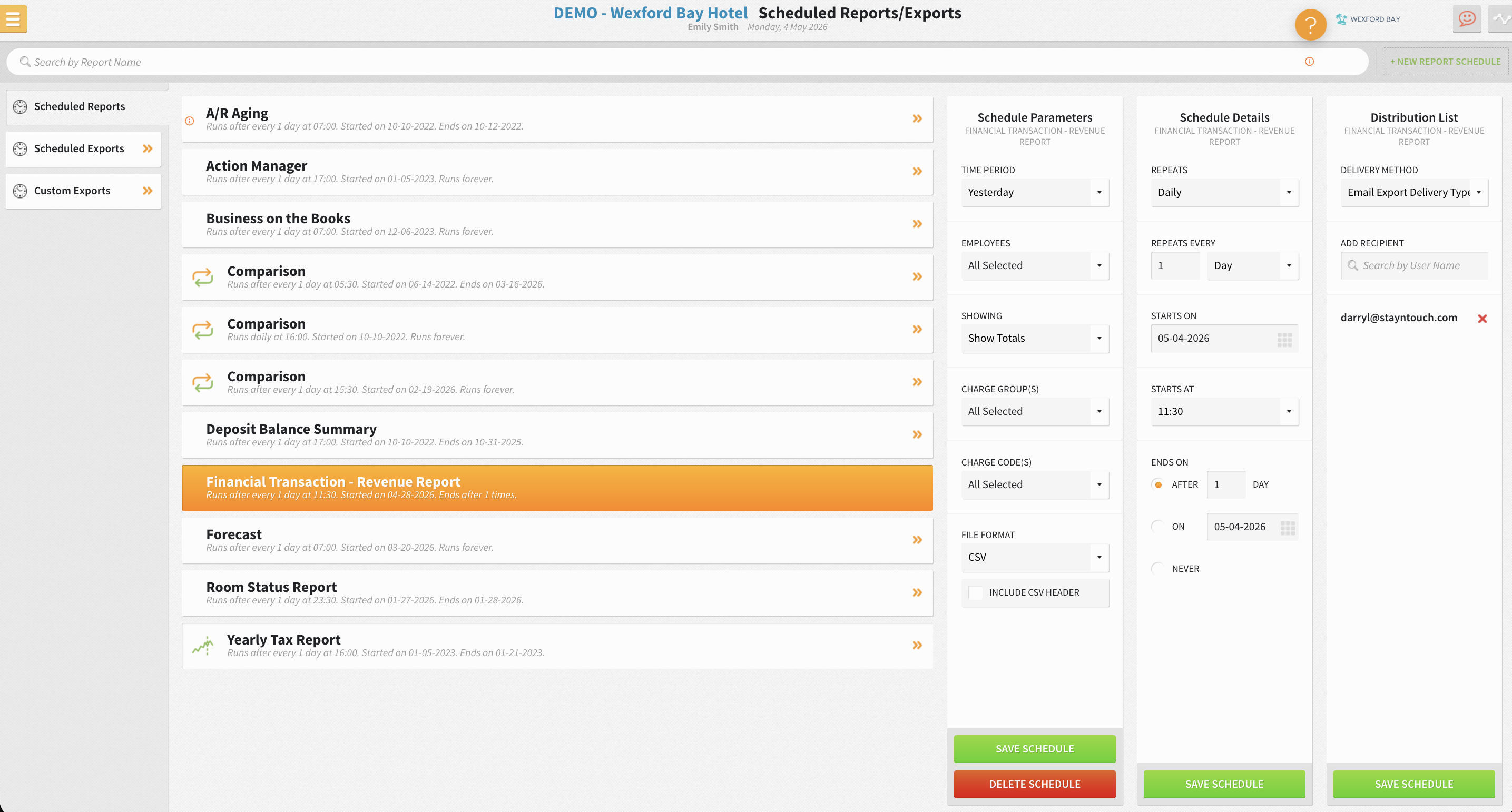
The criteria for moving to Rate Strategy at portfolio scale match the single-property criteria, compressed by the number of properties. When the Monday meeting is consuming more than one hour per property, when override frequency is rising, or when a new property is being added and rebuilding the spreadsheet from scratch is the only option, automation becomes the more efficient path.
For properties that have outgrown rule-based automation and need full demand forecasting and market-data-driven optimization, Stayntouch’s open integration architecture connects to specialist RMS platforms without lock-in or per-interface fees.
Frequently Asked Questions
How long does it take to set up the manual revenue management process described here?
The initial setup, which includes building the demand calendar, constructing the rate ladder, and creating the RevPAR dashboard in Excel, takes most general managers or owners three to four hours the first time. Once the structure is in place, the weekly maintenance routine typically runs in under an hour. The first two to three weeks require more time as historical pace data is assembled and the ladder tiers are calibrated against actual booking behavior. After that, the process becomes routine.
Does a hotel need a dedicated revenue manager to run this workflow?
No. The workflow is designed for general managers, owners, and finance leaders who handle revenue management alongside other responsibilities. The Monday meeting structure and the documented rate ladder are specifically designed to support clear revenue decisions without requiring a dedicated revenue manager. Many independent hotels assign the weekly review to the GM or front office manager. The key is consistency, with the same person, the same day, and the same sequence every week.
How does Stayntouch Rate Strategy differ from a full revenue management system?
Stayntouch Rate Strategy automates rule-based rate movement inside the PMS. It adjusts rates automatically when occupancy crosses a configured threshold, without manual intervention. A full revenue management system (RMS) does additional work such as demand forecasting using market data, competitor rate shopping, and price optimization based on external signals. Rate Strategy suits hotels whose pricing need is disciplined, automated execution of rules they have already defined. Hotels that need full market-data-driven optimization can connect a specialist RMS through Stayntouch’s integration library, which includes Duetto, IDeaS, PriceLabs, Lighthouse, and others. Integration fees are waived, and you pay only the RMS platform’s own subscription cost.
What are the signs that a manual revenue management process is working?
Four signals indicate that the process is producing results. First, ADR on comparable future dates trends upward over a 60–90-day window. Second, occupancy holds stable or improves alongside the rate increase rather than declining as a trade-off. Third, the number of ad-hoc rate changes made outside the documented ladder tiers falls, which means the rules are reliable enough to follow. Fourth, the Monday meeting finishes within the planned time because data assembly is fast and decisions are clear. If any of these four signals is absent after 90 days, the ladder tiers or pace thresholds need recalibration.
How quickly can a hotel transition from manual Excel-based revenue management to Stayntouch Rate Strategy?
The transition is designed to be fast. Stayntouch Rate Strategy trains in 20 minutes and activates instantly, and the documented rules from the manual process become the configured parameters inside the module. Full platform training across all Stayntouch modules takes about two days. A single property can be configured and deployed in approximately one month through Stayntouch’s structured implementation process, which includes a dedicated project manager, remote or on-site deployment options, and 24/7/365 support from the first day of go-live. There are no per-integration fees for connecting the PMS to existing tools in the hotel’s technology stack.
Ready to Replace Repetitive Manual Work?
The workflow in this guide delivers results. A documented rate ladder, a focused weekly meeting, and a simple RevPAR dashboard in Excel will outperform ad-hoc pricing at any property size. The ceiling is the time it takes to run the process manually, and that ceiling often arrives faster than most operators expect.
Stayntouch Rate Strategy moves the rules built in this guide into automated execution inside the PMS. Automation removes the weekly data-assembly burden while keeping strategy decisions with the people who know the property. With a 20-minute training window and instant activation, Rate Strategy sits inside the same platform that runs reservations, housekeeping, payments, and night audit, with 100% system uptime, 1,400+ integrations at no extra cost, and 24/7/365 support included.
Read Next
Turn a more connected stack into a better stay.
See how Stayntouch can support the operating moments that matter most to your hotel team.