
Written by: Kelly Campbell, Vice President of Marketing, Stayntouch
Key Learnings
-
Mobile PMS platforms are built for mobility from the ground up. Unlike traditional systems that tether staff to fixed terminals, a mobile-first PMS gives every team member full operational access from a phone or tablet anywhere on property.
-
Training time is a permanent operating expense. With roughly 70% annual hospitality turnover, every new hire resets the training clock. Full platform training on Stayntouch takes 2 days across all modules, while legacy platforms often require around three months to reach a basic working grasp.
-
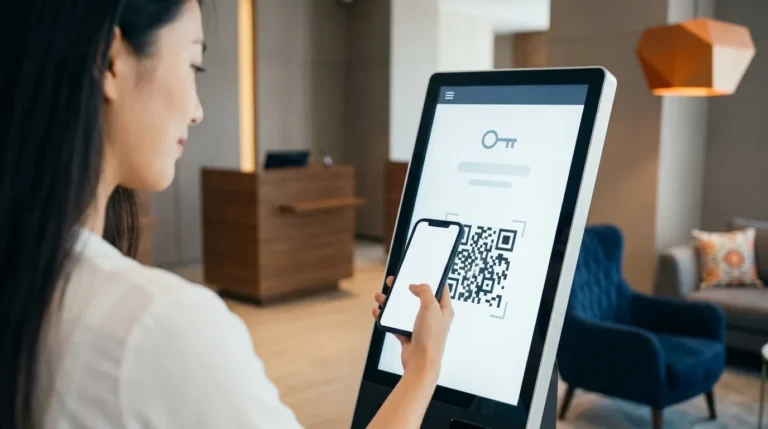
Mobile check-in reduces reliance on the front desk. Guests can complete registration and payment from their own phone or a kiosk in under 30 seconds. Stayntouch customers report a 54% reduction in staff-assisted check-ins.
-
Real-time housekeeping updates drive measurable productivity gains. When housekeepers update room status from the room itself, the front desk sees availability the moment a room is inspected. Stayntouch customer data shows a 25% increase in housekeeping productivity.
-
Integration costs vary widely and should be evaluated explicitly. Some legacy platforms charge as much as $10,000 per integration. Stayntouch offers 1,400+ integrations at no extra cost for the integration itself, while each third-party platform charges its own platform fee.
-
Uptime and offline capability protect operations. Downtime lands directly on guest service. Look for a documented uptime record and offline functionality for critical tasks. Stayntouch has sustained 100% system uptime, with product releases requiring no downtime.
-
Security must be enforced at the integration level. Mobile access expands the attack surface. Role-based permissions should scope each integration’s access to only the data it needs, preventing a breach in one connected system from exposing the full database.
-
Schedule a demo with Stayntouch to see these features in action.
Why Mobile PMS Features Matter Now
Hotel operators face rising labor costs and persistent turnover at the same time. U.S. hotel wage cost per occupied room rose 12.8% in 2025, from $42.82 to $48.32, while labor cost per hour rose 8.0% against U.S. consumer price inflation of 2.7% over the same period. At the same time, the U.S. quit rate in accommodation and food services was 4.3% in March 2026, nearly double the 2.2% private-sector average, with annual hospitality turnover estimated near 70%.
Legacy systems amplify these pressures. When staff stay tethered to a front desk terminal, guests queue in the lobby while agents work through screens. Housekeeping updates travel by radio or paper, so the front desk often works from information that is minutes or hours old. Every inefficiency in the system lands on the guest experience and on the bottom line.
This guide explains the mobile PMS software features that move operational metrics such as check-in time, housekeeping turnaround, staff mobility, and revenue. It also provides a practical framework for evaluating vendors before you enter a demo room.
Schedule a demo to see these features in action.
Mobile PMS vs. Traditional PMS: What Actually Changes
A mobile-first PMS is built for mobility from the ground up. It is cloud-native, accessible on any device, and designed so that every workflow a staff member needs is available from a phone or tablet anywhere on property.
|
Dimension |
Mobile-First Cloud PMS |
Traditional Workstation PMS |
|---|---|---|
|
Deployment |
Cloud-native, no on-site servers |
On-premise or hybrid install |
|
Staff access |
Anywhere on property via phone or tablet |
Fixed to front desk terminals |
|
Guest check-in |
Self-service (phone or kiosk) plus staff-assisted anywhere on property |
Front desk only |
|
Updates |
Automatic, no downtime |
Scheduled maintenance, often with downtime |
|
Training time |
Full platform training takes 2 days across all modules |
Weeks to months to reach basic working grasp |
The table above highlights the operational differences between mobile-first and traditional PMS platforms. Among these, the training time gap carries a particularly heavy cost. With roughly 70% annual hospitality turnover, training time becomes a permanent operating expense. A system that takes three months to learn restarts that clock every time someone new joins the team.
Top Mobile PMS Features That Drive Operational Impact
Mobile PMS features deliver the most value when they improve operational efficiency, staff mobility, and guest experience in measurable ways. The sections below outline the categories that matter most, what to look for in each, and the outcomes they drive.
Mobile Check-In and Checkout
What it is: Guests complete registration and payment from their own phone or a kiosk, with digital keys and payment capture. Staff can also check guests in from a tablet anywhere on property. Mobile check-in uses a separate workflow from a booking engine. Booking engines handle reservation search and booking, while mobile check-in handles the arrival moment after a reservation already exists.
Why it matters operationally: Lobby queues form when check-in stays tied to a fixed desk. Mobile check-in dissolves the queue by spreading the arrival moment across devices and locations. Guests who want a warm human welcome receive it from a staff member with a tablet instead of from behind a monitor. Guests who prefer to walk straight to their room can do so in under 30 seconds.
What to look for: Look for a flow that works on any device and integrates with digital keys and payment gateways. It should also capture upsell opportunities at the moment of highest intent. Confirm that the system supports three paths simultaneously: fully mobile, hybrid pre-check-in, and staff-assisted anywhere on property.
Outcome: Stayntouch customers report a 54% reduction in staff-assisted check-in.
Real-Time Housekeeping Updates
What it is: Housekeepers update room status from the room itself via a mobile device. The front desk sees a room become available the moment it is inspected, not when a radio call is made or a paper sheet is handed in.
Why it matters operationally: Housekeeping is the largest labor line in most hotels, so how work is assigned directly affects cost. Faster room turnaround means fewer guests waiting in the lobby and more confident early check-in commitments. It also turns an operational signal, such as “room inspected,” into revenue by delivering early check-in to guests who paid for it.
What to look for: Prioritize custom task lists, automated task assignment by floor or section, and forward-looking assignment. These capabilities let managers staff tomorrow against tomorrow’s expected departures instead of reacting on the day.
Outcome: Stayntouch customer data shows a 25% increase in housekeeping productivity.
On-the-Go Room Management
Once rooms turn over faster, the next bottleneck becomes managing those rooms in real time.
What it is: Room assignments, status changes such as out of order (OOO) and out of service (OOS), and maintenance requests handled from a mobile device anywhere on property.
Why it matters operationally: A housekeeper who finds a leaky faucet can report it from the room and create a ticket for engineering instantly. The lag between identifying an issue and resolving it shrinks. Managers can reassign rooms, block inventory, and respond to maintenance flags without returning to a terminal.
What to look for: Look for drag-and-drop room assignment, color-coded status views, and integrated maintenance ticketing that creates a data trail for asset management.
Mobile Dashboards and Reporting
Effective room management sets the stage for better decisions, which depend on clear, real-time data.
What it is: Managers view occupancy, average daily rate (ADR, average room revenue per paid occupied room), revenue per available room (RevPAR, room revenue divided by total rooms available), and housekeeping status from any device. Reports are scheduled and delivered automatically.
Why it matters operationally: Real-time visibility lets managers make decisions while walking the property or managing multiple properties remotely. For multi-property groups, a real-time multi-property dashboard supports proactive leadership. A manually assembled report from the next morning forces managers to react after the fact.
What to look for: Seek interactive dashboards that allow action on the underlying data, such as setting prices or adjusting housekeeping assignments from within a graph instead of exporting and re-entering. Customizable reports with automated delivery by email or cloud drive keep teams aligned.
Integrations That Matter on Mobile
Strong reporting depends on a PMS that stays connected to the rest of the tech stack.
What it is: A mobile PMS gains power through its connections. When a guest checks in, the door lock and messaging systems should receive that update instantly, not on the next sync cycle. That level of responsiveness requires real-time connections such as webhooks, which push data the moment something happens, across channel managers, point-of-sale (POS) systems, door locks, guest messaging platforms, and payment gateways.
Why it matters operationally: Mobile access to these systems lets staff act from anywhere without double entry. When integrations stay reliable and real-time, the PMS becomes the single source of operational truth across every department.
What to look for: Look for open application programming interfaces (APIs, the standardized connections two software systems use to exchange data), real-time two-way sync, and no per-integration fees. Stayntouch offers 1,400+ integrations at no extra cost, while each third-party platform charges its own platform fee. Stayntouch does not charge for the integration itself.
Evaluation tip: Ask vendors whether integrations are included or billed per connection. Some legacy platforms charge as much as $10,000 per integration, which turns every technology decision into a budget negotiation.
Offline Mode and Reliability
What it is: A cloud-native PMS on reliable infrastructure such as Amazon Web Services (AWS) with offline capabilities keeps operations running even if the internet connection drops.
Why it matters operationally: Downtime lands directly on guest service. Upgrades should not require scheduled downtime. Stayntouch has sustained 100% system uptime, and product releases require no downtime and generally have no impact on staff usage or the guest experience.
What to look for: Ask for a documented uptime record and offline functionality for critical tasks. Ask vendors what happens when the internet drops and what their uptime record has been over the past two years.
Security and Compliance
What it is: PCI DSS (Payment Card Industry Data Security Standard) compliance, data encryption, tokenization that replaces a card number with a meaningless substitute so real card data is never stored in the system, and role-based permissions that scope each integration’s access to only the data it needs.
Why it matters operationally: Mobile access expands the attack surface. A door lock application should see a room number and checkout date only. A breach in one connected application should not expose the hotel’s full database.
What to look for: Look for PCI DSS Level 1 for payments, SOC 2 Type 1, GDPR compliance, ISO 27001/27018, and role-based access controls enforced at the integration level.
Ask us to walk you through each criterion in a live demo.
How to Prioritize Mobile PMS Features for Your Property
Start by mapping your property’s biggest pain points to the features that solve them, then use that map as your demo script. The table below provides a starting framework.
|
Pain Point |
Priority Feature |
Operational Outcome |
Questions to Ask in a Demo |
|---|---|---|---|
|
Lobby queues at check-in |
Mobile check-in and checkout |
Reduced wait times; staff freed to greet guests |
Can guests check in from their phone in under 30 seconds? Can staff complete a full check-in from a tablet? |
|
Slow room turnaround |
Real-time housekeeping updates |
Faster room availability; fewer guests waiting |
Does room status update the moment a housekeeper inspects it? Can tasks be assigned forward in time? |
|
Staff chained to the desk |
On-the-go room management |
Staff can serve guests anywhere on property |
Can maintenance tickets be created from a mobile device in the room? |
|
Lack of revenue visibility |
Mobile dashboards and reporting |
Real-time ADR and RevPAR monitoring from any device |
Can reports be scheduled and delivered automatically? Can I act on dashboard data without exporting it? |
|
Disconnected tech stack |
Integrations |
Staff act from anywhere; no double entry |
Are integrations included or billed per connection? Do you use webhooks for real-time sync? |
|
Fear of downtime |
Offline mode and reliability |
Operations continue if internet drops |
What is your uptime record? Do upgrades require downtime? |
|
Data security concerns |
Security and compliance |
Guest and payment data protected at every touchpoint |
Are you PCI DSS Level 1 compliant? Is integration access scoped by role? |
Common Pitfalls When Evaluating Mobile PMS Features
The evaluation process has predictable failure modes. Avoiding them matters as much as knowing which features to prioritize.
-
Focusing on feature count over usability. A system with 500 features that takes months to learn often costs more in practice than a simpler one that trains in hours. Ask for the training time commitment in writing.
-
Ignoring training time as a permanent cost. With roughly 70% annual hospitality turnover, every new hire resets the training clock. Earlier sections outlined how Stayntouch completes full platform training in 2 days and front desk training in 2 hours, while legacy platforms often require around three months to reach a basic working grasp.
-
Overlooking integration costs. Some vendors charge as much as $10,000 per integration. Ask whether connections are included or billed separately, and confirm that the answer covers both current integrations and future ones.
-
Not testing on real devices. Always ask for a demo on a phone or tablet, not just a desktop browser. A system that looks clean on a 27-inch monitor may be unusable on the device your housekeeping team actually carries.
-
Forgetting offline reliability. Ask about uptime records and what happens operationally when the internet drops. The answer reveals more about a vendor’s architecture than any feature list.
-
Evaluating the PMS in isolation. The 2026 Hotel Technology Outlook, produced by the NYU SPS Jonathan M. Tisch Center of Hospitality with Stayntouch and IDeaS, found that 38% of hotel professionals cite integration as a top pain point. A mobile PMS that cannot connect reliably to your existing stack creates a new problem rather than solving the old one.
Frequently Asked Questions
What is a mobile PMS?
A mobile property management system (PMS) is hotel management software designed to run on smartphones and tablets, giving staff the full power of the front desk from anywhere on property. That includes reservations, check-in and checkout, housekeeping status, billing, and reporting. A mobile-first PMS is designed around how staff actually move through a property, rather than adapted from desktop software.
How does mobile check-in work?
Guests complete registration and payment from their own phone or a kiosk before or during arrival. They receive a digital key and can go straight to their room without stopping at the front desk. Staff can also check guests in from a tablet anywhere on property, such as at the bar, in the lobby, or at the door. As covered in the mobile check-in section above, this workflow is separate from a booking engine, which handles reservation search and booking.
Can a mobile PMS work offline?
A cloud-native mobile PMS on reliable infrastructure should maintain operations even if the internet connection drops. Look for a documented uptime record and offline capabilities for critical tasks. Stayntouch has sustained 100% system uptime, and product releases require no downtime. For properties in areas with unreliable connectivity, ask vendors which functions remain available offline and which require a live connection.
What integrations are essential for a mobile PMS?
Channel managers, POS systems, door locks, guest messaging platforms, and payment gateways usually matter most operationally. Look for open APIs with real-time two-way sync via webhooks, and confirm whether integrations are included in the platform fee or billed per connection. As detailed in the integrations section, Stayntouch offers 1,400+ integrations at no extra cost, while each third-party platform charges its own fee. Priority integrations to verify include revenue management systems such as IDeaS and Duetto, POS platforms such as Toast and Oracle Micros, door lock systems such as ASSA ABLOY and Salto, and CRM platforms such as Revinate and Salesforce.
How long does it take to train staff on a mobile PMS?
Training time varies significantly by platform and should sit near the top of your evaluation criteria. Earlier, this guide noted that full platform training on Stayntouch takes 2 days across all modules and that front desk staff become operational in about 2 hours. Legacy platforms typically require around three months to reach a basic working grasp. With roughly 70% annual hospitality turnover, a platform that trains in hours lets new hires become productive on their first shift and allows hotels to hire for guest-facing ability rather than technical aptitude.
Mobile PMS Features That Move Your Metrics
Mobile PMS features create value when they reduce check-in time, accelerate housekeeping turnaround, free staff to serve guests instead of screens, and give managers real-time visibility from any device. Each feature category in this guide connects to a measurable operational outcome, and the questions in the prioritization matrix help you test whether a vendor’s implementation delivers those outcomes in practice.
When check-in, housekeeping, room management, and reporting all run from a phone, operational metrics improve together. Guests spend less time waiting, rooms return to inventory faster, and staff spend more time in front of guests and less time behind terminals. That is the outcome a mobile-first PMS is built to deliver.
Experience a mobile-first PMS for yourself in a live walkthrough.
Read Next
Turn a more connected stack into a better stay.
See how Stayntouch can support the operating moments that matter most to your hotel team.